$
0
FREE
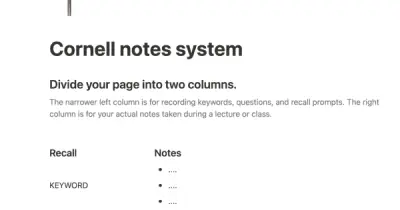
In the 1940s, Walter Pauk, a professor at Cornell University, created a new method of taking notes to help college students organize, condense, and understand the material they were learning. This system has been shown to be very effective as a learning tool. Here, we will explain how to use it in Notion.
Details


USE
FOR
OFF
In the 1940s, Walter Pauk, a professor at Cornell University, created a new method of taking notes to help college students organize, condense, and understand the material they were learning. This system has been shown to be very effective as a learning tool. Here, we will explain how to use it in Notion.
More templates from
Notion

This template allows students to plan their semester or quarter by tracking the weight of assignments, exams, and projects towards their final grade. Students can enter their grades to see how they are doing and prioritize their time accordingly. The template includes formulas to automatically calculate and update the student's progress.

Camilla Alvarez is a busy entrepreneur who has successfully balanced the demands of running a startup with maintaining a healthy personal life. Our video "The Search" features a look at Camilla's workspace and how she uses Notion to manage both her personal habits and her business. Currently, Camilla is focused on achieving her daily fitness goals and hiring a Head of Engineering, but her dashboards can be adapted to fit any changing priorities. You can duplicate her entire workspace, including her workout tracker and engineering interview guidelines, and customize it to suit your own needs.

This product is designed to help you plan and write a thesis or dissertation. It includes features that can help you brainstorm and evaluate potential topics, keep track of your sources and notes, and stay on schedule with a timeline of due dates. You can also use this tool to draft your content in the same space, making it easy to keep everything organized and accessible. Overall, this product is intended to provide you with a comprehensive and convenient workspace for working on your thesis or dissertation.

Track your habits and stay accountable by using this table. Simply replace the existing column titles with the habits you want to track. You can check off items, enter numerical data, or even write text to build a journaling habit. Each day, create a new row and record your progress. Use filters and sums to track your progress over time and monitor any trends. This table is great for daily challenges or keeping track of your habits.

A standard operating procedure (SOP) is a document that outlines how certain tasks or processes should be carried out within a company. Although SOPs can be used for a variety of purposes, the most effective ones share certain characteristics. Here, we have outlined these characteristics to help your team customize this SOP to meet the needs of various departments.

In the 1940s, Walter Pauk, a professor at Cornell University, created a new method of taking notes to help college students organize, condense, and understand the material they were learning. This system has been shown to be very effective as a learning tool. Here, we will explain how to use it in Notion.

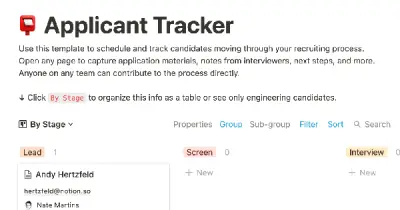
This product allows you to manage the entire job application process on one page. You can organize your resume, cover letter, and portfolio for easy access, and keep track of companies you've applied to with statuses and deadlines. You can sort or filter your applications by stage or due date on a calendar, and take notes on the company, position, hiring manager, your personal preferences, and anything else you need to remember during the application and interviewing process. This can help you stay organized and on top of your job search.

As a startup, having a data room can be invaluable during the fundraising process. It allows potential investors to gain a thorough understanding of your business and its operations. This template can help you quickly set up your own data room, providing a centralized location to store important documents, business details, and data. This can help you present a professional and organized image to investors, increasing the likelihood of securing funding.

This product helps you track your spending and reach your financial goals. You can set a monthly budget and enter your expenses in the database. The filters allow you to view your expenses in different ways, such as by category or by month. You can also view your expenses on a calendar or in a Kanban-style board, broken down by category. This can give you a better understanding of your spending habits and help you make more informed financial decisions.
Related templates

If you're a self-employed food delivery driver, you have a lot to manage, such as mileage, earnings, and taxes. If you're like me, you probably have bits of data scattered across several different apps. Fortunately, the Delivery Tracker Notion Template is now available for download at no cost! This template will help you keep all of your important information organized in one place.

This 100 days of code template allows you to track your progress and build accountability. With all 100 days already set up in advance, all you need to do is fill in the topic, difficulty, and language for each day. You can also document what you've learned on each day's subpage to keep a record of your programming knowledge.

You don't need a complicated system to stick to your New Year's resolutions. This template, inspired by Notion expert Marie Poulin's review system, makes it easy to keep your goals at the forefront of your mind and take action to achieve them. With Notion, you can combine all of your different goals, break them down into manageable tasks and timelines, and track your progress towards making those big changes in your life.

This product is designed for people who want to manage their finances more effectively. It offers a simple and user-friendly interface that allows users to track their bills and expenses, helping them to stay on top of their budget and avoid late payments. The template also includes a feature that automatically calculates the next billing date, allowing users to easily input their monthly rate and have the rest of the work done for them. Overall, this product is an essential tool for anyone looking to get their finances in order.

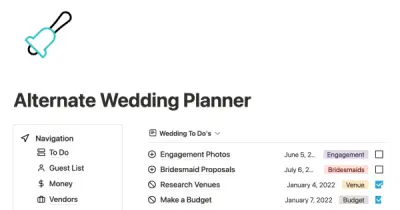
If you're feeling overwhelmed by the wedding planning process, this template can help. It's easy to use and packed with features like money and task management to help you plan and organize your big day. It's perfect for anyone who wants to stay on top of their wedding plans and avoid feeling stressed out.

This template is designed to help students keep track of their university studies. It provides a central location for storing information about assignments, university events, notes and active recall questions, course materials, and more. By using the template, students can keep track of all the content they are learning and easily access it for study purposes throughout the semester. The template offers a convenient and organized way to manage university-related information.