


Projects & goals hub


$
0
FREE
To achieve the goals you set for your team this year, you need more than just a plan — you need a system to keep your goals at the forefront of your mind and connect them to specific projects. This template from another company provides a clear way to see how team projects contribute to company goals, and allows you to build transparency by assigning team leads and timelines. With a system like this, you can plan with clarity and execute with confidence.


More templates from
Notion

This template allows students to plan their semester or quarter by tracking the weight of assignments, exams, and projects towards their final grade. Students can enter their grades to see how they are doing and prioritize their time accordingly. The template includes formulas to automatically calculate and update the student's progress.

A standard operating procedure (SOP) is a document that outlines how certain tasks or processes should be carried out within a company. Although SOPs can be used for a variety of purposes, the most effective ones share certain characteristics. Here, we have outlined these characteristics to help your team customize this SOP to meet the needs of various departments.

This product is designed to help you plan and write a thesis or dissertation. It includes features that can help you brainstorm and evaluate potential topics, keep track of your sources and notes, and stay on schedule with a timeline of due dates. You can also use this tool to draft your content in the same space, making it easy to keep everything organized and accessible. Overall, this product is intended to provide you with a comprehensive and convenient workspace for working on your thesis or dissertation.

As an interviewer, your goal should be to get to know your candidate and help them feel prepared and confident. That's why at Notion, we have created a guide to help you prepare for interviews with us. We have included tips and resources to help your candidate feel more at ease, as well as customizable templates for different roles and departments. By using these templates, you can provide your candidate with important information, such as videos, links, schedules, and more, to help them prepare for their interview.

You can use this template to manage projects and issues for your whole team. Every member of your team can create new tasks, view the tasks they are assigned to, and track progress. Each card on the board can be opened into its own page to store research, notes, and even sub-tasks in the same place. You can also add tags to each card to designate department and priority, and add the people involved so that everyone knows what their colleagues are working on. This makes it easy to filter and find specific tasks.

Track your habits and stay accountable by using this table. Simply replace the existing column titles with the habits you want to track. You can check off items, enter numerical data, or even write text to build a journaling habit. Each day, create a new row and record your progress. Use filters and sums to track your progress over time and monitor any trends. This table is great for daily challenges or keeping track of your habits.

If you live with other people, this product can help you establish rules, track shared finances, ensure that everyone is happy with how the space is being used, and more. It's a convenient way to manage your home and maintain harmony among all residents.

In the 1940s, Walter Pauk, a professor at Cornell University, created a new method of taking notes to help college students organize, condense, and understand the material they were learning. This system has been shown to be very effective as a learning tool. Here, we will explain how to use it in Notion.

Increasing brand awareness is an important aspect of a marketing strategy. Our team at Notion loves to share information about new features and help others promote their product. We have created an influencer template to keep track of upcoming sponsorships and important creator details such as subscriber count, cost, platform, and more. This template can serve as a central hub for all your influencer resources and assist your team in managing sponsorships.

The following course schedule includes a comprehensive list of weekly topics, readings, assignments, and exams. This schedule allows you to create your own categories and topics for your own teaching purposes.
Related templates

The following is a modified version of a project management template that can be used to coordinate any team effort. This template is based on the one used by the team at The Futur for prelaunching digital products, but all specific and detailed information has been removed. Use this structure to help manage your own team projects.


The product is a free financial tracker that helps users track their income and expenses on a monthly basis. The system was developed by Humphrey Yang (@humphreytalks) and accurately records all transactions. A yearly summary is included at the top of the page to provide an overview of the user's financial status for the year. Tracking expenses is a simple and effective way to understand one's financial situation and make informed decisions about budgets, savings goals, and investments.


This aesthetic Notion personal planner template is an all-in-one solution for managing your time, staying organized, and achieving your goals. This watercolor-themed planner allows you to keep track of your essentials, including To-Do lists, notes, daily schedules, and finances. Use this template to stay on top of your personal life and achieve your goals. The planner includes a finance tracker, goal tracker, habit tracker, and note taker.


This template is designed to help users organize their tasks and keep an overview of upcoming and overdue tasks. It also includes features that help users track their progress on different projects and ensure they are on track with their goals.


Collecting feedback is an essential part of any growing startup looking to improve their product. This feedback tracker allows you to centralize all of your product feedback from various platforms into a single, accessible database. Use the Notion Web Clipper to quickly capture online feedback and embed the details into a subpage. You can prioritize certain features by categorizing feedback with quantifiable tags. This template will help give your customers a voice and provide clarity on what the team should focus on.
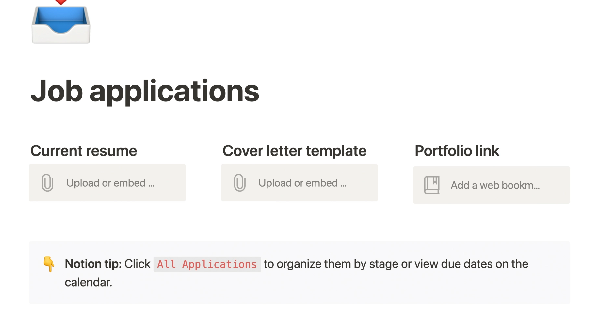
This product allows you to manage the entire job application process on one page. You can organize your resume, cover letter, and portfolio for easy access, and keep track of companies you've applied to with statuses and deadlines. You can sort or filter your applications by stage or due date on a calendar, and take notes on the company, position, hiring manager, your personal preferences, and anything else you need to remember during the application and interviewing process. This can help you stay organized and on top of your job search.

The Lean Canvas is a one-page business model that helps entrepreneurs quickly and easily document their ideas. Unlike traditional business plans, which can take a lot of time and effort to create and are rarely updated or read by others, the Lean Canvas is simple and easy to understand. It provides a quick and efficient way to document your business idea, making it easier to plan, launch, and grow your startup.


This tool is designed to help individuals and teams manage their projects and tasks more efficiently. With features like infinite sub-issues, sprint tracking, due date estimates, and progress tracking, it can help you stay organized and on top of your work. Additionally, the tool provides suggestions for what to do next and helps identify outdated tasks so you can focus on the most important work. Overall, this tool can help you and your team work more effectively and efficiently.


The following template offers digital creators a comprehensive set of tools to help them launch and grow their online businesses. It can help creators:


This template is designed to help students keep track of their university studies. It provides a central location for storing information about assignments, university events, notes and active recall questions, course materials, and more. By using the template, students can keep track of all the content they are learning and easily access it for study purposes throughout the semester. The template offers a convenient and organized way to manage university-related information.

