

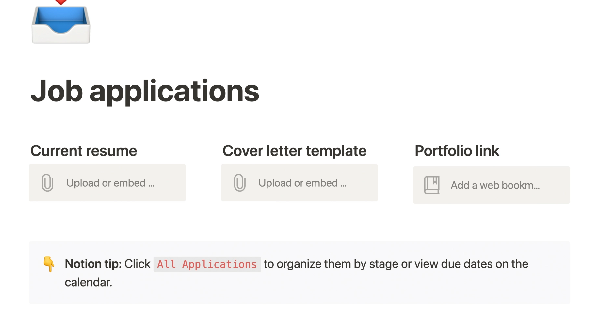


Job application tracker


1


$
0
FREE
This product allows you to manage the entire job application process on one page. You can organize your resume, cover letter, and portfolio for easy access, and keep track of companies you've applied to with statuses and deadlines. You can sort or filter your applications by stage or due date on a calendar, and take notes on the company, position, hiring manager, your personal preferences, and anything else you need to remember during the application and interviewing process. This can help you stay organized and on top of your job search.


More templates from
Notion

This template allows students to plan their semester or quarter by tracking the weight of assignments, exams, and projects towards their final grade. Students can enter their grades to see how they are doing and prioritize their time accordingly. The template includes formulas to automatically calculate and update the student's progress.

A standard operating procedure (SOP) is a document that outlines how certain tasks or processes should be carried out within a company. Although SOPs can be used for a variety of purposes, the most effective ones share certain characteristics. Here, we have outlined these characteristics to help your team customize this SOP to meet the needs of various departments.

This product is designed to help you plan and write a thesis or dissertation. It includes features that can help you brainstorm and evaluate potential topics, keep track of your sources and notes, and stay on schedule with a timeline of due dates. You can also use this tool to draft your content in the same space, making it easy to keep everything organized and accessible. Overall, this product is intended to provide you with a comprehensive and convenient workspace for working on your thesis or dissertation.

As an interviewer, your goal should be to get to know your candidate and help them feel prepared and confident. That's why at Notion, we have created a guide to help you prepare for interviews with us. We have included tips and resources to help your candidate feel more at ease, as well as customizable templates for different roles and departments. By using these templates, you can provide your candidate with important information, such as videos, links, schedules, and more, to help them prepare for their interview.

You can use this template to manage projects and issues for your whole team. Every member of your team can create new tasks, view the tasks they are assigned to, and track progress. Each card on the board can be opened into its own page to store research, notes, and even sub-tasks in the same place. You can also add tags to each card to designate department and priority, and add the people involved so that everyone knows what their colleagues are working on. This makes it easy to filter and find specific tasks.

In addition to academics, many students are involved in extracurricular activities like clubs and organizations. Notion is an excellent tool for managing information related to these groups and activities. With this template, you can create institutional knowledge, keep it organized, capture ideas, and keep everyone on the same page. Use this template to manage your clubs and teams effectively and efficiently.

Track your habits and stay accountable by using this table. Simply replace the existing column titles with the habits you want to track. You can check off items, enter numerical data, or even write text to build a journaling habit. Each day, create a new row and record your progress. Use filters and sums to track your progress over time and monitor any trends. This table is great for daily challenges or keeping track of your habits.

If you live with other people, this product can help you establish rules, track shared finances, ensure that everyone is happy with how the space is being used, and more. It's a convenient way to manage your home and maintain harmony among all residents.

In the 1940s, Walter Pauk, a professor at Cornell University, created a new method of taking notes to help college students organize, condense, and understand the material they were learning. This system has been shown to be very effective as a learning tool. Here, we will explain how to use it in Notion.

The following course schedule includes a comprehensive list of weekly topics, readings, assignments, and exams. This schedule allows you to create your own categories and topics for your own teaching purposes.
Related templates

The Creator Studio is a template designed for Twitter and Gumroad content creators. It helps users enhance their productivity and improve their content by providing a way to manage, track, arrange, and organize their ideas for seamless day-to-day posting.


This template can help you stay organized, focused, and motivated throughout the school year. It can be used to track your courses, schedule, personal projects, club meetings, and events. Use this template to make the most of your school year and achieve success.

The following template offers digital creators a comprehensive set of tools to help them launch and grow their online businesses. It can help creators:


This template is designed to help users organize their tasks and keep an overview of upcoming and overdue tasks. It also includes features that help users track their progress on different projects and ensure they are on track with their goals.


The modern reading list includes a wide range of materials, such as articles, videos, podcasts, blog posts, Twitter threads, and books. To help you keep track of everything you want to read now or later, we've created a dashboard template. With the Notion Web Clipper, you can easily save any of this content from the web directly to your Notion workspace, so it's always available when you need it. Use this template to manage your reading list and stay organized.

This template is used as a database to store frequently bought groceries. It allows users to add details like price and frequency of purchase, as well as a check box to indicate items that need to be purchased. The template also has a view that filters to only items with a checked box, allowing users to calculate the total amount of money they will spend on their next trip to the store.


This product is a fast, easy, and organized way to plan and execute work at a startup. It includes over 20 templates, including an admin control panel, customizable dashboard, CEO's dashboard, and team management board.


If you're a self-employed food delivery driver, you have a lot to manage, such as mileage, earnings, and taxes. If you're like me, you probably have bits of data scattered across several different apps. Fortunately, the Delivery Tracker Notion Template is now available for download at no cost! This template will help you keep all of your important information organized in one place.


This is a tool for organizing all of the notes you take throughout the day. Simply click "New" and start typing. You can create views to separate your notebooks by different parts of your life, invite friends or teammates to collaborate, and view notes as a list or a gallery. This tool allows you to share notes privately or publicly and keep track of any changes made by others. It offers a convenient and easy-to-use solution for managing your notes.

This product helps individuals prepare for their upcoming job interviews. It provides a list of common interview questions and offers a space for reflection on potential answers.

